Value display
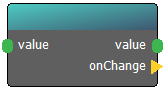
The Value display node provides a real-time visual representation of data within the ERGS editor and the Room Master UI. While it acts as a passthrough for data, its primary role is to give operators and designers instant insight into the current state of a variable.
When to use this node:
* Live Monitoring: Displaying the current password, a player's score, or a sensor reading directly on the Room Master’s dashboard.
* Event Triggering: Using the onChange output to fire an action whenever the incoming value shifts, such as triggering a sound effect every time a score increases.
* Exposing Pins: Enabling is external pin to ensure this specific value is easily accessible and visible in nested diagrams.
Connectors in
- value [type: variant]
Connectors out
- value [type: variant]
- onChange [type: action]
Node properties
- description [type: string]
- is external pin [type: bool]
- pin name [type: string]
- show description [type: bool]