MQTT Video Player
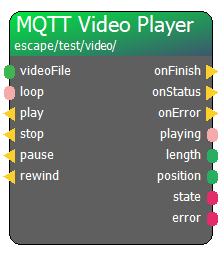
The MQTT Video Player node provides comprehensive remote control over the AdventureHouse Video Player. Beyond simple play and stop commands, it offers real-time feedback about the playback status, including the current position and total length of the video.
When to use this node:
* Cinematic Briefings: Starting an intro video when the game begins.
* Video Clues: Playing a specific video clip as a reward for finding a hidden object.
* Interactive Media: Using the position and length outputs to trigger logic at specific timestamps within a video (e.g., turning on a light at 01:30 of a clip).
Pro Tip:
Monitor the state string and onError action to build robust logic that can alert the Room Master if a video file fails to load or play correctly.
Connectors in
- videoFile [type: variant]
- loop [type: bool]
- play [type: action]
- stop [type: action]
- pause [type: action]
- rewind [type: action]
Connectors out
- onFinish [type: action]
- onStatus [type: action]
- onError [type: action]
- playing [type: bool]
- length [type: integer]
- position [type: integer]
- state [type: string]
- error [type: string]
Node properties
- loop [type: bool]
- mqtt path [type: string]
- MQTT QoS [type: integer]
- MQTT retain [type: bool]
- name [type: string]
- videoFile [type: string]