Action display
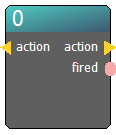
The Action display node is primarily a visual debugging tool used within the ERGS editor. It provides a real-time visual alert whenever an action trigger passes through it, allowing you to "see" the flow of logic during a live game session or testing.
When to use this node:
* Logic Troubleshooting: Placing it between complex logic chains to verify if a signal (like a "puzzle solved" event) is actually reaching its destination.
* Visual Confirmation: Monitoring the fired boolean to drive other editor-only indicators or logs.
Pro Tip: This node is non-destructive; it passes the action signal directly through to its output without any delay, so you can safely insert it anywhere in your diagram for monitoring.
Connectors in
- action [type: action]
Connectors out
- action [type: action]
- fired [type: bool]
Node properties
- description [type: string]
- show description [type: bool]