LLM Tool
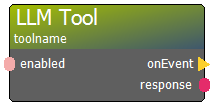
The LLM Tool node is a bridge between the AI's "brain" and the room's physical logic. It defines a specific function that the AI can choose to "call" when it needs to perform an action.
How it Works:
* Global Pairing: You can place this node anywhere in your diagram. It automatically registers itself as an available tool for any LLM Model in the session.
* Instruction via Description: The description property is the most critical part. It tells the AI exactly what this tool does (e.g., "Use this tool to unlock the drawer when the user correctly guesses the riddle").
* Event Execution: When the AI decides to use the tool, the onEvent action fires immediately. You can connect this to Maglocks, DMX lights, or any other node in ERGS.
* Response Context: The response output provides the text from the AI that accompanied the tool call.
Pro Tip: Tools are shared across model sessions. If you have multiple AI characters, they can all access the same pool of room-control tools.
Connectors in
- enabled [type: bool]
Connectors out
- onEvent [type: action]
- response [type: string]
Node properties
- description [type: string]
- enabled [type: bool]
- tool name [type: string]