Ui
UI Node
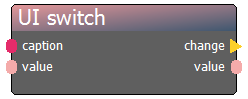
The UI nodes are components used to build the Roommaster’s dashboard interface, accessible both within the ERGS application and via the web. Unlike standard logic nodes, these represent physical UI elements that allow the operator to monitor and control the game in real-time.
Organization & Layout: The placement of these elements is governed by two key properties:
-
Room Hash: This defines which "Card" (a container in the Bootstrap-based web interface) the element belongs to. All nodes sharing the same
roomhashwill be grouped together visually. -
Position: Within a specific Card, the
positioninteger determines the vertical order of the elements. -
CSS Class: You can apply custom styling to individual elements by assigning a CSS class, allowing for branded or thematic dashboards.
Connectors & Properties: All UI nodes share a standardized set of connectors and properties to ensure consistent logic flow:
| Group | Name | Type | Description |
|---|---|---|---|
| In | caption | string | The text label displayed on or near the UI element. |
| In | value | bool | Sets the current state of the element (e.g., if a switch is ON). |
| Out | change | action | Fires whenever a user interacts with the element (e.g., clicking a button). |
| Out | value | bool | Outputs the current state of the element. |
| Prop | force reload ui | action | Forces the dashboard to refresh its visual state. |
UI Element Types: The specific visual appearance and behavior of a UI node are defined by its YAML template. Available types include:
-
Interactive: button, edit (text input), radiogroup, slider, switch.
-
Visual/Display: label, led, progressbar.
-
Layout/Style: divider, styler.
Technical Note: The appearance of these nodes is fully customizable through the Studio configuration. While the logic remains the same, the YAML template determines whether a node looks like a toggle switch, a tactical slider, or a simple status LED.